Showing posts with label InterNet. Show all posts

Wednesday, 13 March 2013

Tips to Disable Right Click On Your Blog


Are you worried because you think your blog content is being copied without your permission? I wrote a post in the past on how to fight content thieves but I didn't mention disabling right click because I never saw it as a good idea. A visitor might want to copy your tutorial to a notepad for reference purpose but disabling right-click on your blog makes this impossible. This can actually make you lose visitors. The simple truth is that only a very few percentage of your visitors want to copy your content for the purpose of using it on their own blog.

 Also, disabling right click on your blog just to protect your content looks rather unprofessional to me. I won't advice you to do this because I, personally can't do it. Well, that's just my own opinion though, you can follow the process if it's important you implement it on your blog but I still maintain it ain't cool. :)

To disable right click on your blog:

 1. Login to your blogger account

 2. Click on Design > Edit HTML

 3. Search for <head>

 4. Paste this code just below it:


<script language='Javascript'>
function mycontextmenu() {
alert('Sorry, right-click has been disabled');
return false;
}
document.oncontextmenu = mycontextmenu;
</script>


It should look just like this:

 5. Save your template and visit your blog. You'll only find out that right click is totally disable.

 6. This is optional but you can change the characters in red to your personal text. This is the message that'll be displayed instead of context menu.

 Like I said earlier, disabling right-click is a lame method to protect your content and I won't recommend it to anyone. Have you given it a thought that regular visitors won't even be able to right click on a link and open it in a new tab? It's one of the ways to frustrate your regular visitors and drive them off.

How To Bypass Disabled Right-Click:

 In case you visit a site with right-click disabled, there's a way to bypass it. Just copy the javascript below and paste it into the address bar, hit ENTER and it totally disables whatever right click script used:


javascript:void(document.onmousedown=null);void(document.onclick=null);void(document.oncontextmenu=null)


Read More

5 Popular Reasons Why Blogger is Better - Blogger Vs Wordpress


I have seen so many webmasters trying to serious decampaign blogger. Many claim that blogger is hard to personalize and that it will continue being bloggers property. In this case, i would like to talk about a blogger blog using a custom domain and a WordPress self hosted blog.

 Well, the fact that even a custom domain on blogger will still be under a blogger dynasty will still scare too many people. I am not saying that it is bad to be self hosted, i am just trying to point out some issues which many people tend to neglect.

Blogger vs WordPress via SEO
 Search Engine Optimization is one of the major reason why people stay alive in the competitive blogging world. If your blogging platform is not good for SEO, then it is not worth continuing with it. I have actually come to believe that blogger is better than WordPress via SEO. It is true that WordPress has some SEO areas where it is better than blogger but when all has been summed up, Blogger will remain at the top.

Duplicate Content 
 WordPress blogs normally produce so many duplicate content. In order to avoid this, a person needs to write a good robot.txt. But it does not take long to realise that many people have killed their blogs with robot.txt. However, blogger does not need all that little expertise of robot files, you blog can still move around duplicate content in blogger, it is not a big problem.

Hacking and Security 
 WordPress is a target of many hackers, the platform has to keep on releasing new version in order to patch up the security flaws in the earlier versions. It is one reason which makes a blogger custom domain blog far better than a WordPress blog. A person needs to log in into their control panel to check whether there are new versions. Failure to do, will result into saying good bye to your blog. With blogger, you can leave your blog for a years and find it as you left it. In WordPress, if you try to do so, it will be hacked. I have just seen one serious issue at blogger, they were trying to upgrade and but turned into a major error, they had to roll back the upgrade and everything turned normal within hours.

 Well, if you want a secure blog, then blogger is the best option

Usability 
 Operating a blogger blog is one of the easiest things to do, but if you are to use WordPress, your hands have to get dirty if you want to save your blog. There are some thing which you have to do with your themes, tools, permalinks and others. Those are a must things for any one with a WordPress blog. With blogger, if you can run your blog for years without any major changes on it apart from making posts.
 When it comes to which platform is easy to use, then we can not argue on this one, blogger is better.

Making money online
 Without doubt,blogger is the best platform for those who want to make money online. Blogger is fully customized with Adsense. It is easy to open an Adsense account while on blogger, There is a monetize tab which will help to make your blog monetized quickly. You can also use Amazon on blogger. I am not saying that you can not use Amazon and Adsense on other platform, but it is easier on blogger

Conclusion
 Since search engine optimization, security and making money online are some of the best objectives and goals for any blogger. It it turns out that blogger is ahead of WordPress in those areas, i come to a conclusion that Blogger is better than WordPress
Read More

FiX Wordpress internal Server Error (500) Trick


Last week, when I entered to all of my WordPress blogs which hosted in same web hosting account, I found that all of my blogs have encountered Internal Server Error 500. I felt panic and don’t have any idea how to solve the problem, then I tried to search some info from Google to see whether I can get help or not.
There are several solutions that other bloggers have provided and guild us how to solve the problem of Internal Server Error, unfortunately none of them can really help me. Most of the posts saying that most probably is due to the corrupted of .htaccess file. They asked to backup the current .htaccess and then create and blank .htaccess file and upload again. Hmmm.. this method can’t work for me!
I guessed there must be something happen on my hosting, if not why all of my blogs having the same error since I didn’t change wordpress themes, upload new plugins, update posts and etc. When the time I login to my cPanel page, I get shocked to see the Cpanel CPU and Memory Usage is full. Yes, this is the problem caused all my blogs cannot be displayed due to the memory allocation to the files.
After that, I tried to contact my hosting technical support, they replied that it may be is due to huge of plugins used on my blogs, and asked me to take down those unusable plugins. What the hell?! I don’t have many plugins on my blogs, all the while my blogs are working fine for many years, of course I can’t accept this reason. Beside that, my technical support also suggest me go to change VPN server to support all my current blogs. I really want to fuck him because I only have few blogs without using high bandwidth, why I need VPN server? Really stupid technical support!!!
I know Internal Sever Error is most likely caused by low memory limit on my server this time, but I have nothing to do how to lower down the memory usage, then I just wait until second day. When the time I wake up from my bed, all my blogs were working fine, the cPanel CPU and memory usage is back to normal. Thanks god!
Anyway, if you found Internal Server Error 500 on your WordPress blog, I advise you to check the CPU and memory usage on your cPanel account first, if the CPU and memory usage is working fine, the most probably you can try to check your .htaccess file or plugins usage on your blog.
Read More

7 Powerful Tips To improve Your Google Adsense CTR (Click Through Rate)

Increasing your Google AdSense click through rate can have such a massive positive impact on how much your site earns so if you have a website which currently has a very low click through rate then your going to want to pay close attention in this article.


Tip 1 – Use the default Google blue colour for the title of your ads

When you set up your ads make sure you always select the default Google blue colour. Even if your sites theme is a different colour still use blue because people on the internet have been conditioned for years to click on links which are (blue) if you start using red, yellow and green etc your CTR may drop.

Tip 2 – Reduce the options on your page

You need to make sure your site is clean and organized without all the clutter. If you have lots of other distractions on your site then your CTR will plummet and you will lose a lot of revenue. All you need is your content, ads, header and if you want to include any widgets in the sidebar then recent posts, pages or categories will be OK to use.

Tip 3 – Experiment with ad positions

Most of the time the 336×280 block and a 160×600 sidebar ad block will nearly always work very well how ever there’s no harm in still testing to see if you can squeeze out even more profits from your AdSense site

Tip 4 – Don’t use images in your content

Images will effect your CTR on your sites because they attract attention so you will end up getting less clicks and making less money. Basically do not use any images if you want to maximize your sites AdSense income.

Tip 5 – Never use borders with your ads

Do not ever use borders in your ads this is an absolute terrible mistake to make. Borders make them look like obvious ads and will again reduce your CTR by a lot. Instead select your page background colour for your ad border colour so it blends in.

Tip 6 – Ads above the fold

AdSense ads that are above the fold will get many more clicks so always put at least 2 type of ads above the fold. The fold is basically anywhere you can see before you scroll down the page.

Tip 7 – Make sure your content has relevant keywords

If you do not have relevant keywords within your content then you will not trigger the correct type of ads for your site so that means you may not get the best type and most relevant ads which will end up giving you a very low CTR. Good unique, quality content which is keyword rich and relevant to the type of ads that you want to be visible on your site.
Read More

20 SEO Terms You Must Know


If you have a website or blog, or if you work with anything related to the Internet, you’ll certainly need to know a bit about search engine optimization (SEO). A good way to get started is to familiarize yourself with the most common terms of the trade, and below you’ll find 20 of them. (For those who already know SEO, consider this post as a refresher!). 1. SEM: Stands for Search Engine Marketing, and as the name implies it involves marketing services or products via search engines. SEM is divided into two main pillars: SEO and PPC. SEO stands for Search Engine Optimization, and it is the practice of optimizing websites to make their pages appear in the organic search results. PPC stands for Pay-Per-Click, and it is the practice of purchasing clicks from search engines. The clicks come from sponsored listings in the search results.
 2. Backlink: Also called inlink or simply link, it is an hyperlink on another website pointing back to your own website. Backlinks are important for SEO because they affect directly the PageRank of any web page, influencing its search rankings.
 3. PageRank: PageRank is an algorithm that Google uses to estimate the relative important of pages around the web. The basic idea behind the algorithm is the fact that a link from page A to page B can be seen as a vote of trust from page A to page B. The higher the number of links (weighted to their value) to a page, therefore, the higher the probability that such page is important.
 4. Linkbait: A linkbait is a piece of web content published on a website or blog with the goal of attracting as many backlinks as possible (in order to improve one’s search rankings). Usually it’s a written piece, but it can also be a video, a picture, a quiz or anything else. A classic example of linkbait are the “Top 10″ lists that tend to become popular on social bookmarking sites.
 5. Link farm. A link farm is a group of websites where every website links to every other website, with the purpose of artificially increasing the PageRank of all the sites in the farm. This practice was effective in the early days of search engines, but today they are seeing as a spamming technique (and thus can get you penalized).
 6. Anchor text: The anchor text of a backlink is the text that is clickable on the web page. Having keyword rich anchor texts help with SEO because Google will associate these keywords with the content of your website. If you have a weight loss blog, for instance, it would help your search rankings if some of your backlinks had “weight loss” as their anchor texts.
 7. NoFollow: The nofollow is a link attribute used by website owners to signal to Google that they don’t endorse the website they are linking to. This can happen either when the link is created by the users themselves (e.g., blog comments), or when the link was paid for (e.g., sponsors and advertisers). When Google sees the nofollow attribute it will basically not count that link for the PageRank and search algorithms.
 8. Link Sculpting: By using the nofollow attribute strategically webmasters were able to channel the flow of PageRank within their websites, thus increasing the search rankings of desired pages. This practice is no longer effective as Google recently change how it handles the nofollow attribute.
 9. Title Tag: The title tag is literally the title of a web page, and it’s one of the most important factors inside Google’s search algorithm. Ideally your title tag should be unique and contain the main keywords of your page. You can see the title tag of any web page on top of the browser while navigating it.
 10. Meta Tags: Like the title tag, meta tags are used to give search engines more information regarding the content of your pages. The meta tags are placed inside the HEAD section of your HTML code, and thus are not visible to human visitors.
 11. Search Algorithm: Google’s search algorithm is used to find the most relevant web pages for any search query. The algorithm considers over 200 factors (according to Google itself), including the PageRank value, the title tag, the meta tags, the content of the website, the age of the domain and so on.
 12. SERP: Stands for Search Engine Results Page. It’s basically the page you’ll get when you search for a specific keyword on Google or on other search engines. The amount of search traffic your website will receive depends on the rankings it will have inside the SERPs.
 13. Sandbox: Google basically has a separate index, the sandbox, where it places all newly discovered websites. When websites are on the sandbox, they won’t appear in the search results for normal search queries. Once Google verifies that the website is legitimate, it will move it out of the sandbox and into the main index.
 14. Keyword Density: To find the keyword density of any particular page you just need to divide the number of times that keyword is used by the total number of words in the page. Keyword density used to be an important SEO factor, as the early algorithms placed a heavy emphasis on it. This is not the case anymore.
 15. Keyword Stuffing: Since keyword density was an important factor on the early search algorithms, webmasters started to game the system by artificially inflating the keyword density inside their websites. This is called keyword stuffing. These days this practice won’t help you, and it can also get you penalized.
 16. Cloaking. This technique involves making the same web page show different content to search engines and to human visitors. The purpose is to get the page ranked for specific keywords, and then use the incoming traffic to promote unrelated products or services. This practice is considering spamming and can get you penalized (if not banned) on most search engines.
 17. Web Crawler: Also called search bot or spider, it’s a computer program that browses the web on behalf of search engines, trying to discover new links and new pages. This is the first step on the indexation process.
 18. Duplicate Content: Duplicate content generally refers to substantive blocks of content within or across domains that either completely match other content or are appreciably similar. You should avoid having duplicate content on your website because it can get you penalized.
 19. Canonical URL: Canonicalization is a process for converting data that has more than one possible representation into a “standard” canonical representation. A canonical URL, therefore, is the standard URL for accessing a specific page within your website. For instance, the canonical version of your domain might be http://www.domain.com instead of http://domain.com.
 20. Robots.txt: This is nothing more than a file, placed in the root of the domain, that is used to inform search bots about the structure of the website. For instance, via the robots.txt file it’s possible to block specific search robots and to restrict the access to specific folders of section inside the website.
Read More

Tuesday, 12 March 2013

Add the Glitter Effect Mouse Pointer to Your Blogspot/Blogger Blog

The code for this tweak is javascript. All you need to do is to add the javascript code to your template but only within the head (<head></head>) tag.

The Head Tag

The head tag begins with this tag: <head> and ends with this tag: </head>. Go to Layout->Edit HTML.


Locate for end head tag (</head>) and paste your javascript code above it, then save.


The Code:


<script type="text/javascript">
// <![CDATA[
var colour="#666666";
var sparkles=40;

var x=ox=400;
var y=oy=300;
var swide=800;
var shigh=600;
var sleft=sdown=0;
var tiny=new Array();
var star=new Array();
var starv=new Array();
var starx=new Array();
var stary=new Array();
var tinyx=new Array();
var tinyy=new Array();
var tinyv=new Array();
window.onload=function() { if (document.getElementById) {
var i, rats, rlef, rdow;
for (var i=0; i<sparkles; i++) {
var rats=createDiv(3, 3);
rats.style.visibility="hidden";
document.body.appendChild(tiny[i]=rats);
starv[i]=0;
tinyv[i]=0;
var rats=createDiv(5, 5);
rats.style.backgroundColor="transparent";
rats.style.visibility="hidden";
var rlef=createDiv(1, 5);
var rdow=createDiv(5, 1);
rats.appendChild(rlef);
rats.appendChild(rdow);
rlef.style.top="2px";
rlef.style.left="0px";
rdow.style.top="0px";
rdow.style.left="2px";
document.body.appendChild(star[i]=rats);
}
set_width();
sparkle();
}}
function sparkle() {
var c;
if (x!=ox || y!=oy) {
ox=x;
oy=y;
for (c=0; c<sparkles; c++) if (!starv[c]) {
star[c].style.left=(starx[c]=x)+"px";
star[c].style.top=(stary[c]=y)+"px";
star[c].style.clip="rect(0px, 5px, 5px, 0px)";
star[c].style.visibility="visible";
starv[c]=50;
break;
}
}
for (c=0; c<sparkles; c++) {
if (starv[c]) update_star(c);
if (tinyv[c]) update_tiny(c);
}
setTimeout("sparkle()", 40);
}
function update_star(i) {
if (--starv[i]==25) star[i].style.clip="rect(1px, 4px, 4px, 1px)";
if (starv[i]) {
stary[i]+=1+Math.random()*3;
if (stary[i]<shigh+sdown) {
star[i].style.top=stary[i]+"px";
starx[i]+=(i%5-2)/5;
star[i].style.left=starx[i]+"px";
}
else {
star[i].style.visibility="hidden";
starv[i]=0;
return;
}
}
else {
tinyv[i]=50;
tiny[i].style.top=(tinyy[i]=stary[i])+"px";
tiny[i].style.left=(tinyx[i]=starx[i])+"px";
tiny[i].style.width="2px";
tiny[i].style.height="2px";
star[i].style.visibility="hidden";
tiny[i].style.visibility="visible"
}
}
function update_tiny(i) {
if (--tinyv[i]==25) {
tiny[i].style.width="1px";
tiny[i].style.height="1px";
}
if (tinyv[i]) {
tinyy[i]+=1+Math.random()*3;
if (tinyy[i]<shigh+sdown) {
tiny[i].style.top=tinyy[i]+"px";
tinyx[i]+=(i%5-2)/5;
tiny[i].style.left=tinyx[i]+"px";
}
else {
tiny[i].style.visibility="hidden";
tinyv[i]=0;
return;
}
}
else tiny[i].style.visibility="hidden";
}
document.onmousemove=mouse;
function mouse(e) {
set_scroll();
y=(e)?e.pageY:event.y+sdown;
x=(e)?e.pageX:event.x+sleft;
}
function set_scroll() {
if (typeof(self.pageYOffset)=="number") {
sdown=self.pageYOffset;
sleft=self.pageXOffset;
}
else if (document.body.scrollTop || document.body.scrollLeft) {
sdown=document.body.scrollTop;
sleft=document.body.scrollLeft;
}
else if (document.documentElement && (document.documentElement.scrollTop || document.documentElement.scrollLeft)) {
sleft=document.documentElement.scrollLeft;
sdown=document.documentElement.scrollTop;
}
else {
sdown=0;
sleft=0;
}
}
window.onresize=set_width;
function set_width() {
if (typeof(self.innerWidth)=="number") {
swide=self.innerWidth;
shigh=self.innerHeight;
}
else if (document.documentElement && document.documentElement.clientWidth) {
swide=document.documentElement.clientWidth;
shigh=document.documentElement.clientHeight;
}
else if (document.body.clientWidth) {
swide=document.body.clientWidth;
shigh=document.body.clientHeight;
}
}
function createDiv(height, width) {
var div=document.createElement("div");
div.style.position="absolute";
div.style.height=height+"px";
div.style.width=width+"px";
div.style.overflow="hidden";
div.style.backgroundColor=colour;
return (div);
}
// ]]>
</script>
Read More

How to Cash Out Your Google Adsense inCome With Western Union


This post is only for newbies who have joined Google Adsense recently. This post may irritate old users of AdSense. But be cool as there are all types of visitors in blog  sphere.

Many new AdSense users wants to know how to cash out their payments, What are the Payment options introduced by Google AdSense, What is the schedule Google send payments, these are the common questions. I try my best to answer all these question and specially how to cash out AdSense payment via Western Union.


Let me tell you what are the payment options Google AdSense use to send AdSense publisher earnings.

Google AdSense Payment Options:


  • Payment by Cheque
  • Payment by Electronic Funds Transfer
  • Payment by Western Union Quick Cash
These are the three payment options available for Google AdSense. If you have chosen payment by Cheque, Cheque reaches at your home address near after one month. It takes you towards to late. Non US publishers don’t like it. Cheque can be lost too.
Electronic Funds Transfer another payment option by AdSense can be use for receiving your earnings. It is direct funds transfer into your Bank account.

Google AdSense Payment Schedule:

If you have earned 100$ in any month till the last of that month then next month in last dates you will get your payment. for example you have started working with AdSense in January and till 31 first January you have earned 100$ or more then in last dates of February you will get your payment.

How to Cash out Payment via Western Union:

Now I move towards that how to cash out payment via Western Union. A most used method for receiving payments among AdSense publishers. Near all countries are supported for this payment option. Most fast and easy way to cash out. No need for any opening of bank account. Just having any national identity makes you enable for receiving payments via this method.

If you have chosen Western Union as a your payment option then just follow these steps. If you have earned 100$ or more in previous month in your AdSense account then start checking Your Google AdSense payment history page after 26 of that month. This is the time you can get MTCN (Money Transfer Control Number) on that page. MTCN number can appear at any time after 25-26 of the month. When ever it appear note it down. Now you have gotten most important thing of your payment process. Things you need to cash out are:

  • Your National identity.
  • Sender Information.
  • Amount.
  • MTCN code.

All above defined things must have with you while going to cash out you payment.Find out any Western Union agent near you, Normally they sits in Banks, Post Offices, or money exchange service providers. Go to Western Union agent and give him/her all details you have with you, Within 5 minutes you will get your payment in your hands.


Read More

Set up Google Anylytics On Your Blogspot/Blog


Google Analytics is a service for tracking your traffic. It will show you information about your visitors: from where did they came to your blog, what keywords they was using in search engines (to find your blog), from that back links they came from, the countries where they live, landing pages etc.
 How to setup Google Analytics:
 1. First of all, you need to have Google account. Just go to Google and create it. After that, go to Google Analytics page and sign in and click sign up.
 2. Enter your blog URL, account name, choose your country and click "Continue".
 3. Enter your last name (optional), first name (optional), telephone (optional), country, click "Continue".
 4. Read the following terms and conditions bla bla bla (optional =)))), check the checkbox, and click "Create new Account".
5. Now you will get a code. You need to put it in to your blog template. Go to your blogger account -->Layouts --> Edit HTML --> Backup your blog. Copy and paste the code into the bottom of your content, immediately before the </body> tag . Save your template. Go back to Analytics page and click "Continue".
Read More

40 Most Wanted Tips to Avoid a Disabled or Banned AdSense Account

New Google AdSense publisher? Just started displaying ads on your web pages? If you are not careful enough, you may soon end up getting your AdSense account disabled or banned. Have your read their terms and conditions? Are you aware of their program policies? If you are really serious about making money online, you must read them. Because, I’m sure you don’t want to get banned from this amazing program. Read the following points (or tips) carefully to learn what to do, specially what not to do, in order to save your AdSense publisher account.


How to avoid getting banned from Google AdSense publisher program?


  1. Never click your own AdSense ads.
  2. Never ask friends and family members to click your Ads.
  3. Never use robots to generate clicks or impressions.
  4. Never generate clicks by compensating users.
  5. Never try to get click by using phrases such as “click the links”, “visit these links” etc.
  6. Never use misleading labels for ads. For example: “Favorite Sites” or “Today’s Special Offers”.
  7. Never use graphics directing users to click Google ads.
  8. Never post misleading images alongside ads.
  9. Never alter any portion of the generated ad codes.
  10. Never disclose your exact earning information (CTR, eCPM, earnings etc).
  11. Never use some techniques to open ad links in a new window.
  12. Never place more than three ad units on a web page.
  13. Never place more than three link units on a web page.
  14. Never place more than two search boxes on a web page.
  15. Never link directly to AdSense for Search results pages.
  16. Never try to modify or automate search queries on AdSense for search boxes.
  17. Never use AdSense with other ads networks,  specially when their ad formats looks same.
  18. Don’t create different publisher accounts for different websites. One account is enough.
  19. Don’t format your site content to make it completely indistinguishable from ads.
  20. Don’t use any automated ad impression generation programs.
  21. Don’t display ads in web pages without content.
  22. Don’t display ads on copyrighted content. Never steal and publish others’ content.
  23. Don’t display ads in a floating box script.
  24. Don’t post your ad codes with emails.
  25. Don’t include your ads in software applications or toolbars.
  26. Don’t include AdSense for Search code in any software application.
  27. Avoid paid-to-click, paid-to-surf, autosurf and click-exchange programs.
  28. Avoid programs or packages that provide “guaranteed” page views.
  29. Avoid unsolicited mass emails for promotion of your site.
  30. Avoid topics that violates content guidelines. For example: adult, violent or other illegal stuffs.
  31. Avoid linking to adult, violent and illegal websites.
  32. Avoid using excessive, repetitive or irrelevant keywords on your web pages.
  33. Avoid “doorway” pages created just for search engines.
  34. Avoid hidden text or hidden links on your web pages.
  35. If you are using online advertising for traffic, make sure you comply with Google’s Landing Page quality guidelines.
  36. Respect Google trademarks. Never try to mimic any Google page. Never display any Google brand feature (trademarks, logos etc) in any manner that implies a relationship or affiliation with Google.
  37. Add disclosure about Google Advertising Cookies in your Privacy Policy.
  38. Adhere to the Google webmaster quality guidelines.
  39. Always respond to emails sent by AdSense team.
  40. Create quality content. Last, but the most important point. Mind it!
As a publisher, you must follow the AdSense Program Policies and Terms & Conditions. If you don’t, Google reserves the right to disable ad serving on your web pages and/or disable your publisher account at any time. Beware! Better, try to avoid the above mistakes that most people commit before getting their account disabled or banned. Happy earning with Google AdSense!

Read More

Post to Blogger Via Email (Mail2Blogger)

Blogger is one of the most popular and easy-to-use blogging platforms out there. Even a novice user can use it without any problem. Mail-to-Blogger is one of the many useful features that makes blogging more enjoyable on this blogging platform. This feature lets you blog via email. All you need to do is create an email with your blog post content and send it to a special email address. In simple words, Mail to Blogger feature turns any email account into a blog posting application. This is a cool feature and you can use it to update your blog on the go!


To post to your blog via email, you need to configure an email address first. Follow these steps to create your Mail-to-Blogger email address:

  1. Login to your Blogger account.
  2. Go to the ‘Settings‘ section of your blog.
  3. Open the ‘Email & Mobile‘ tab inside the ‘Settings’ section.
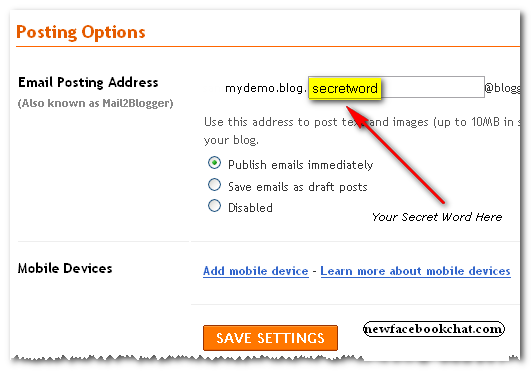
  4. You’ll see Email Notifications and Posting Options. Under Posting Options, Create an email address by entering a secret word before @blogger.com.
  5. Write down the address. It will be used to send posts via email to your blog.
  6. Under the email address, there are three options: Publish emails immediately, Save emails as draft posts and Disabled. Choose the right option (preferably Save emails as draft posts).
  7. Press ‘Save Settings‘ button to update your posting options.

Once you have saved your Settings, you can start sending email to your blog. Create an email with whatever you want to post to your blog and send it to the email address (created in the 4th step above). The subjects of your emails will be the titles of your posts, and the body of the emails will be your blog posts. You can post both text and images (up to 10MB in size). To add an image with your blog post, simply attach an image to you your email. For better formatting, use HTML mode (if available) while writing your email. In plain  text mode, never insert any HTML tags in your post. Sometimes email clients automatically insert text or ads to the bottom of each sent message. To make sure such unwanted stuff doesn’t get posted to your blog, put #end  at the end of your post.
Note: Keep the posting email address secret. Never share it with others. Because, anyone who knows that address will be able to post to your blog.
Read More

Blogging is The Most Perfect Way To Make Money Online

It’s easy to create a blog and make money through blogging but when we talk about make money, it’s very simple and easy way to do with your blog. Before think about making money, let’s talk about blogging, if you are new in, you must need know how to create & promote a blog. Can create a free blog with Blogger or can do self hosted blog with your own domain name on WordPress. Now! you must have some idea to update your blog with content, just choose any niche whatever you like and have knowledge about that. Try to update your blog on daily basis or weekly basis whatever you like but if you wanna have more visitors So, give them daily post so that they can come daily on your blog to read.


Perfect Way to Make Money?
Now! your blog is ready with good & original content. let’s talk about make money with blogging.
 1. Apply for Google Adsense, it will take 3 working days to let you know application status. don’t forget to read Get Adsense Account Approved Quickly.
 2. If your Adsense application is approved then start Make money with adsense.
 3. Can start make money with Affiliate marketing, just go to www.cj.com and sign up there.
 4. If your blog have more traffic, can sell ads & links with www.buysellads.com.
Read More

How to Get Your Blog on the First Page of Google Trick


How about 5 easy tips about how to get your blog on the first page of Google? Yeah, I see you are shaking your head and smiling. I think you are understand that if your blog will get on the first page of Google - you will get much more traffic to your blog, because bigger part of Google users use only first page of Google search results. That's why it is so important to get on the first page of search results. Believe me or not, but this method is working. For example, I have a collective social blog (or community) where everyone can make their own posts, share articles, tips, reviews and knowledge - Mocii.com, most of the posts are about Tech/Gadgets, reviews, how to's. It is also useful because you can submit an unique article there and put backlinks to your blog or posts from your blog (link will be without nofollow tag). So, all my posts on Mocii.com are on the first page of Google search results (most of them in Top 5, some of them on the first position!)
5 Tips - How to Get Your Blog on the First Page of Google:


  • Submit posts with unique content. Your blog content must be unique, content is a king! Do not steal content from other blogs, Google will see everything! If you really like someone's post, you can re-wright it. Your content must be 99% unique. Don't wright every hour, it is too much. Submit 1-3 posts / day and keep this tempo.
  • After you will create 10 posts on your blog, you must add your blog sitemap (rss) to Google Sitemap. If you have Blogger blog - use your RSS, if you are using, for example, Wordpress - create sitemap with Google Sitemap Generator or create your own sitemap. After adding - Google will crawl your sitemap everyday and he will know about all your new posts. Remember, Google will love you if you will have blog with good, quality and unique content.
  • Add your blog and RSS to blogs and RSS catalogs and readers. Use Google to find them. This will give you lot of free backlinks and traffic.
  • Submit some unique articles to article directories. Don't forget to put backlinks with anchors to your blog and to some of your posts. Articles must have the same subjects as your blog or post. Do not submit too often.
  • Put your backlink everywhere where its possible. Put your link to DMOZ, make answers on Yahoo! Answers (use backlinks in your answers), make comments on different blogs, and submit your articles to social bookmarks.


Read More

Why People Don’t Visit Your Web Site – Blogger Tips

We always encourage online users to visit our websites or blogs. But it is not easy any why people always don’t visit your website although you have done your part? There are few reason here:-


No original content – It’s important to give your visitors information they can’t find any-where else. If you’re the only source for a certain type of information, people will flock to your web site.

No free News – Supply news stories related to your web site. People want up-to-date news on the topics they are interested in. They will also be interested in visiting your web site.

No free contest or sweepstakes – People like to win things. If you can fulfill that need, people will stop by to visit your website more often.

Offer free e-zine – Most people love to get free information that they’re interested in emailed to them on a regular basis. This saves them time and money.

No free community – People like to have a place were they can have discussions with others on certain topic. You could add a chat room or message board or forum to your web site.

No free Software – Most people like to find good deals on software for their computers. If the software is free, that is even better.

No free affiliate program – One of people’s basic needs to survive is money. When you offer them a free opportunity to make money they’ll line up to visit your web site.

No free online utility – When you offer a utility that can solve a problem, people will visit your web site. The utility could be a free autoresponder, e-mail account, search engine submission, etc.

No free directory – Create a directory of web sites on a particular topic that is related to your target audience. People will visit because they will find what they’re looking for, all in one place.

No free samples product or service – Have you ever been to a website and you jumped at the chance to get a free ebook?
Read More

Monday, 11 March 2013

20 Tips How to Increase your Blogger/Blogspot Traffic?


  • Participate in related Forum.
  • Bookmarking sites
  • Read and provide valuable comment on other blogs.
  • Submit blog site to search engines.
  • Add RSS subscription link like feedburner
  • Ping the blog when you have new post such as rpc.pingomatic.com
  • Sign-up with StumbleUpon and download the toolbar.
  • Join mybloglog.com
  • Submit article to ezines
  • Link exchange
  • Search engine optimizations (SEO)
  • Word of mouth
  • Provide rich contents in your blogs
  • Participate in Joint ventures
  • Publish your own ebook
  • Join Affiliate Networks
  • Buy links but not encourage
  • Email marketing
  • Media advertising
  • Per Per click advertisement such as Google Adwords, YPN and MSN
  • Do you have any other ideas?

Read More

Ways to Increase Traffic to Your Blogger/Blogspot


Previously we have learn the tips how to increase your blogger/ traffic. There are many ways to attract traffic to your site, lets look at the following ideas might help bloggers jump to the sky:-
1. Trade links – Many webmaster trade link with other web sites and the site must be related to the subject of your web site. Instead of trading links, you could also trade banner ads, page ads, classified ads.
2. e-zine – Start e-zines for your web site. Sign up e-zine directory and publish e-zine to let people read each issue in order to revisit your web site.
3. Online community – Form an online message board, e-mail discussion list or chat room. When people get involved in your community they will regularly return to communicate with others.
4. Write articles – Submit your articles to e-zines, web sites and magazines that accept article submissions. You can include your business information or signature or web address at the end of the article.
5. Freebies – Give away and allow your visitors do the same. This will increase your web exposure and attract people to your web site at the same time.
6. Product packaging – Combine your products or services into one big package deal with other businesses offerings. You could share a web site and advertise the package deal.
7. Directories – Submit your freebie to the online directories that list your particular item or service for free. If you’re offering a free e-zine, submit it to all the free e-zine directories on the internet.
8. Message boards – Post answers to other people’s questions and ask questions and post appropriate information. You may Include your signature at the end of all your postings.
9. Classified or sponsor ads – Exchange with other free e-zine publishers. If there is a huge subscriber difference between e-zines, one can run more ads to make up for it.
Read More

The Benifit Of Good partnership B/w Blogs And Google Adsense


At present, we believe that Adsense is more commonly used as an effective tool to display contextual ads related to an organization or a product on the site. If a visitor clicks on the merchant to try it on the poster earns a percentage of sales revenue. Many homeowners are increasingly used the Google Adsense model as it is very effective and popular. Blogging is great for AdSense revenue. Let us see in the following paragraphs, which is a blog used to increase profits Adsense.

Only use the niche blogs that tend to generate more revenue through AdSense. You can select a separate segment of the site, the amount of ad space is obtained in the post. If things do not foster an excessive price and not viable for advertising on sites that trade costs are very high. You should use tools such as Overture keyword phrase to search for keywords and more frequent and how much is paid per keyword. The important thing here is to get your website ranked well in search engines.

It 'good to remember that if the ads are related to the content of the website, then your website will have more opportunities to make it to the top search engines. You can also place the AdSense code to the design of the site to other Web sites easier maintenance. Along with the blog going, you can also choose to use these channels to help you know which sites are your making money more than other sites. You should look at least a week after sending the ad to see the site of its effectiveness. To determine the net site visitors a week to see which ad format is well suited best for you.

Another very effective way is to combine the ads on the site. You have the opportunity to play a spot with no limit on the announcement can be found easily on Google. It 'better to publish a maximum of 3 ads per page in the network. You must be able to serve the most expensive advertising time in any way. You may also want to be in any way to scroll ads. You never see any ads on every page of a slide. Announcements are usually sent to more than paid hotspots.

With the implementation of a blog, you will be able to paste ads in the following sizes as a rectangle of 336 x 280, the 300 x250 rectangle and x 160 600. Depending on the type of Internet browser and web page advertisements can appear in many sizes. It is best to try and track the results for each site.

Thus, we see that the execution of a blog with Adsense works best to make your Web site, searches of people and additional income by the end. Running a blog is used to publish one way links to your site. You need to use blog software solution such as robots that can tolerate more than a thousand links to websites of technology. It 'can also save a list of control once the use of hyperlinks in the future
Read More

Now Make Money With Google Adsense Without Yours Websites


Direct Download Center 100% Adsense Revenue Sharing Program

DirectDownloadCenter.com is free software download center. You can download any Freeware and Shareware directly from publisher. They have setup a system to share 100% AdSense revenue to all contributing members from all traffic that you sent to their site.

 It is easy to use DirectDownloadCenter.com to earn advertising revenue. There are two ways to do it:

 1. Link to any pages of DirectDownloadCenter.com using your referrer code. Traffic sent from your link will display Google Ads using your Adsense ID 90%.

 2. Referring your friends to be our member and getting your ads displayed on their traffic 10% of the time. It's easy, just link to any pages using your referrer code and wait for his/her registering.

 All you have to do is to guide your friends to download software from them or invite your friends to be their member and start getting money!!.

 Publish or share software with your friends and start getting money too!!

Join Now!! Make Money With Adsense Without Your Website. Apply now!
Read More

Learn How to Make Money From Blogging


More and more people are realising that blogging is one of the best ways to start your own online business. It requires minimal start up costs, you can build an impressive and loyal readership over time and once you know how to monetize your blog it can also bring in a decent income that will keep on coming even on the days when you don’t update your blog.
There are several ways to set up a blog online. You could use WordPress, Blogger, or another free site that hosts your blog for you; or alternatively you can set up your own blog under your own domain name.
In This Time Everyone doing Blogging beacuse the people decided that we earn money with great source blogging. I have more experiance about blogging and i tell u that how to earn money with blogging. So if you want to make serious money from blogging, you must have complete control over your blog – and that’s something the free blogging accounts won’t give you. You’ll be bound by their terms and conditions and that usually includes not being able to actively promote anything. There are plenty of people who have established a blog only to have it removed without notice some weeks or months later.
It will cost you a few dollars to buy your domain name and set up a web server that will host your blog, but the benefits will far outweigh the cost involved. It can literally be as little as $20 a year we’re talking about here – and that buys you total freedom.
Once you’re ready to set your blog up you’ll need to choose a good theme and layout for it. You might find one that relates to your choice of subject (more on that in a moment) or else there might be one you just like the look of. But there are thousands of templates available for you to use – a simple search on Google will reveal the ones that will be best suited to your topic.
But perhaps the most important question is what you are going to blog about. The whole world is your oyster here – some people blog about their lives in general; some blog about their jobs; some blog about their hobbies; some tell the world about their kids and what it’s like to be a parent, and still others blog about the weird world of celebrities. But whatever you choose to blog about it needs to be something you are passionate about. Don’t forget, you are going to be writing about this topic several times a week, and if you don’t have the enthusiasm for it, that will show in your posts – and no one else will have the enthusiasm to read them.
Okay – so you’ve got your subject. Now you have to start writing your blog posts. If you take a look at just a few of the blogs already online, you’ll notice that the length of the posts varies a lot. Some people only write a paragraph or two each time, but you’ll get better results if you go for something a little longer than this. Around 400 to 500 words makes for a good post with a lot of information in it; some people write hugely long posts that are thousands of words long and could be called an e-book by another name.
But you can also take the format of this blog, by posting a short blog entry which leads into a longer article. This has the benefit of highlighting a lot of blog posts on the home page of the site, and people can then click through and read the ones they like the most.
You should remember however that there are no real rules when it comes to blogging. Over time you will naturally find what works for you, and your blog will settle down into a nice pattern that both you and your readers will enjoy. You’ll find your character and personality will start to come through in your writing too; don’t fight against this as it is one of the hallmarks of blogging. It is, after all, a personal account of an individual’s life and experiences, so show people what you’re made of! You’ll get a more loyal – and bigger – audience like this.
So you’ve got your blog up and running and you’re posting to it on a regular basis. The next step is to get it in front of as many interested eyeballs as possible.
One great way to do this is to submit it to as many of the social bookmarking sites as possible. You can also join social networking sites and build a profile which contains a link to your blog. Other no cost ways to generate traffic include writing free articles for article directories with a link to your blog at the end, and creating signatures at the end of any posts you make to internet forums, and also in all the emails you send out. When you really start thinking about it, you don’t actually need to spend anything to generate plenty of traffic.
All we need to do now is monetize the blog itself. You’ll want to generate some money from all the visitors you’ll start getting, and there are plenty of ways to do this easily. Google Adsense is probably the most well known method – you can join the program for free and display contextual ads that your visitors will be interested in to maximise your click through rate.
There are also a handful of websites which give you the opportunity to get paid for each blog post you make on a specific subject. Pay Per Post and Review Me are two such examples, and they will pay you a certain amount of money to review a product or website for the owner. In a similar vein you can also review and recommend other people’s products through affiliate links inserted into your blog posts, and earn money on commissions earned through any purchases people make.
And once you’re more established you can offer ad space on your blog too, and charge a fee for both classified and display ads if you wish. What could be better than setting your own price?
But there is one final step you can take with your blog if you enjoy a change of scene every now and again. You can sell your blog! Once it is established and has plenty of revenue and traffic, you can usually sell it for ten times its monthly revenue.
And then, you can start all over again with a whole new subject!
So that’s it – profitable blogging in a nutshell. If you have any questions feel free to leave your comments in the form below. And once you’ve done that, get out there and get started building your first blog today.
Read More

Remove PIN Code Hold From Your Google AdSense Account in 2 Minutes


Google AdSense is one of the best and most popular platform to make money from your blogs and websites. One of the Best thing about Google AdSense is, its free to join and they pay you with nicely. However, when you join them, they send a PIN (personal identification number) when you earn your first $10. The code reaches your home in about 4 weeks however you do not get the PIN Code, you apply for second time. But, if you do not receive the code even after applying for second time. Then you can ask Google AdSense team to remove PIN hold from your account without entering PIN code.

Remove PIN Hold From Your AdSense account
I am supposing you have applied for Google AdSense PIN code 2 times and still did not receive any. Here are the steps to remove PIN hold from your account within 2 minutes.

Login in Your Google AdSense Account and Go to My Account
Click on "PIN Information Page"


Now, you will reach to a new page where you can Apply for a PIN code for 3rd Time.
Click on "Request a new PIN"


Dont worry, You dont have to wait for the PIN code to be reached in your home. Once you have applied for a PIN code 3rd time, Go back to PIN code page and you will see a new link on the same page (i.e. PIN code page) saying;

If you do not receive your PIN code within 3 to 4 weeks click here

Actually, this will link will ask you to submit your documents displaying your name and address as in your Google AdSense account. All you have to do is, click on that link then you will see a form, put your name, pub ID, upload your document and click on SUBMIT.
Once you have submitted your document, just wait for 2 minutes and go back to your AdSense account
You will see that, Google has removed your PIN hold. Now you can receive your payments from Google :)

Note: Earlier, Google Adsense publishers were required to submit their documents (bank statement, telephone bill, photo id etc) displaying their information as in Google Adsense account through an email. Now Google have an online form where you can upload your document and Google removes PIN hold immediately once you have submitted a document via that form.


Read More

Sunday, 10 March 2013

5 Best Ways to Make Money From Your Blogs - Long Time


1. Google AdsenseThere is Several ways to Make Money Online in This Article  i will tell how u can make money with yours blog. We talked about how we can earn money by writing and Now, Lets talk about How you can earn money from blogs. Initially Blogging was used only as a medium of expression and to voice your opinions and thoughts. Nowadays , blogging has become money making online activity which can generate a reasonable amount of income. If you have the flair and passion to write, you can start doing the job you like while earning money at the same time. There are five ways to earn money from your blog. They are:

A popular way in which you can earn money blogging is with Advertising. You can refer to Google Adsense and Amazon Associates for this purpose. This is the most common method of earning from a blog. Once your blog becomes well known and is well-received in a particular niche, it is possible to sell ad space on your own blog. For lesser-known blogs, services such as Google’s Ad Sense or BlogAds enable bloggers to establish ad programs. AdSense pays you based on how many readers click on the ads.
2. Affiliate programs
Another way to earn money from your blog is with Affiliate Programs. You can choose from many available online. Pick one that is free to join and pays a good commission for your referrals.
3. Help sell others’ products
Affiliate programs enable your blog to serve as a link between readers and online sites offering various goods and services. One popular choice is Amazon.com. For example if you offer a book review in your blog, an affiliate program will provide a means for your readers to click directly from your blog to Amazon to obtain further information about the book. If they charge their card, you get paid as well.
4. Market your services in your blog
Many people think that blogs are exclusively used to voice your opinions. Blogs are an ideal venue to share your thoughts with others, but we should not overlook their capacity to generate new business and income. You can mention references and what you do to the person reading your blog. That will spread your opinion and your business at the same time.
5. Selling an E-book
If you enjoy writing, you may consider selling an E-book on your blog. You can write about a subject you have much knowledge in or interview and expert and turn it into a book. You will need to learn how to create E-books and there are plenty of resources online.
Read More